
Key Takeaways
- Preparation and environment alignment save significant assessment time
- Dynamic analysis succeeds when tools configured the right way
- “No traffic” often means “wrong setup,” not “secure app.”
Mobile security assessments often involve unexpected obstacles that can hinder analysis. This blog highlights practical, field-tested techniques to overcome common real-world challenges.
1. Proxy-Unaware Libraries: The Hidden Traffic Problem
Challenge:
Proxy-unaware libraries (e.g., OkHTTP in Flutter/Xamarin) bypass system proxy settings, making some app traffic invisible to interception tools like Burp Suite—even when Secure Socket Layer (SSL) pinning is not present. Missing traffic risks incomplete assessments.
Solution:
Use a rooted or jailbroken device and configure HTTP Toolkit to forward traffic to Burp Suite. For Flutter apps, modify the Android Packet Kit APK with Reflutter, sign it, and enable Burp’s “Invisible Proxy” mode. Tools like Apktool and grep help identify hybrid frameworks.
2. Root Detection Evasion: Custom Approaches
Challenge:
Custom root detection in Android apps can block dynamic analysis, even when standard tools like Objection or public Frida scripts fail.
Solution:
Begin by reverse engineering the APK using tools such as jadx or JD-GUI to locate the specific locate root detection logic. Carefully examine the code to identify functions like RootCheck.isRooted that check for common root indicators. Once these functions are identified, you can utilize Frida to override them at runtime. Injecting this script via Frida ensures the application treats the device as non-rooted, allowing you to proceed with testing or usage. It is important to customize your Frida scripts according to the unique implementation of each app for a reliable bypass of root detection mechanisms.
3. Location Restricted Apps: Store Availability and Runtime Controls
Challenge:
Some mobile applications restrict access based on geographic location, affecting both app availability in official stores and feature access within the application. This is commonly encountered during assessments of region‑specific apps such as banking, telecom, or government services that are published only in certain countries. In such cases, testers may be unable to download the production build or access core functionality unless the device appears to be located in a supported region.
Solution:
iOS (Apple App Store):
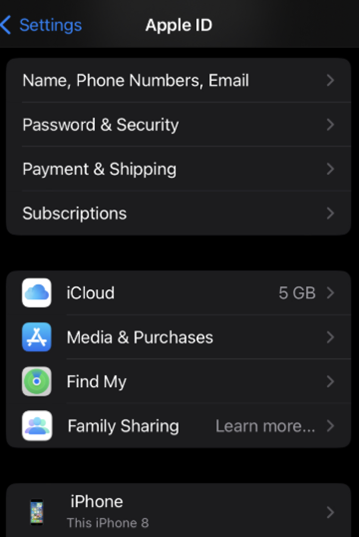
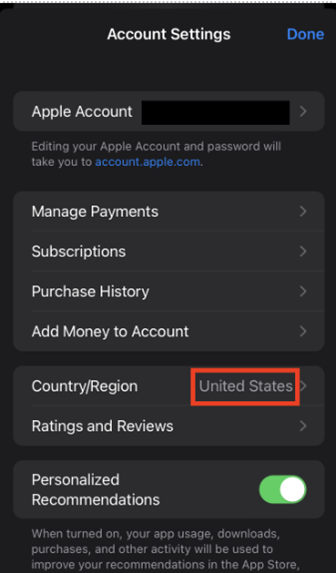
For region‑restricted iOS apps, update the Apple ID country to the required location. On the device, tap your name → Media & Purchases → View Account → Country/Region, and select the target country. Once updated, the app can be downloaded directly from the App Store.
Android (Google Play Store and Runtime Checks):
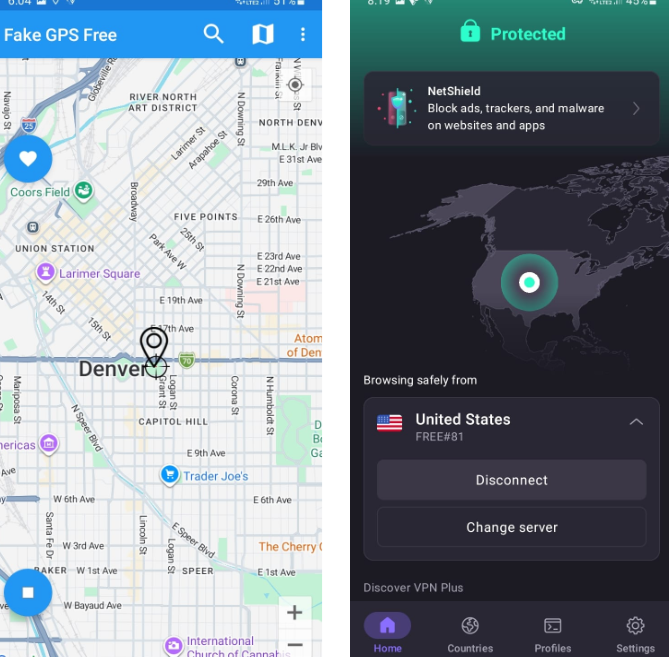
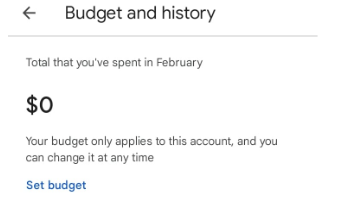
On Android, both store availability and in‑app location checks can typically be addressed using the same approach. Use a fake GPS application to set the device’s location to the target country and connect to a VPN in the corresponding region. If the Play Store continues to show the original region (e.g., local currency under Payments & subscriptions → Budget & history), clear the Play Store app data and sign in again. In persistent cases, creating a new Gmail account helps avoid cached regional settings.
4. Extracting IPA Files from iOS Devices
Challenge:
When only the App Store version is available, testers may need to extract the IPA file directly from the device for analysis.
Solution:
Start by establishing a Secure Shell (SSH) connection to the device and navigating to/var/containers/Bundle/Application. Next, use Filza or a similar file management tool to identify the container ID associated with the target application. Once located, copy the entire .appdirectory into a newly created Payloadfolder. Then, compress (zip) this Payload folder and rename the resulting archive to have a.ipa extension. Finally, transfer the resulting IPA file to your workstation for further analysis.
5. Frida Server Versioning on Android/iOS
Challenge:
Mismatched Frida server versions or incorrect architecture can break dynamic analysis setups.
Solution:
On Android devices, you can determine the system architecture by running adb shell uname -m, and then install the matching Frida server version
For iOS devices, if installing the latest Frida server build does not work as expected, you can utilize a bash script to install a specific version, as detailed in the Corellium guide.
6. Environment & Advanced Protections: TLS, mTLS
Challenge:
Intercepting mobile app traffic can be blocked by TLS pass-through requirements, mutual TLS (mTLS) needing both client and server certificates. These controls complicate analysis and require tailored approaches.
Solution:
Use Burp Suite’s TLS pass-throughfeature to allow specific endpoints to bypass interception while capturing the rest. Go to Proxy settings → TLS pass through, and add the required URL, IP, or range.
For mTLS, obtain the client certificate and private key, create a PKCS#12 bundle, and configure Burp Suite to present it; if not possible, request the client to temporarily disable mTLS.
With the right tools and tailored approaches, even complex mobile assessment hurdles can be efficiently resolved. These solutions help practitioners conduct more effective and reliable security evaluations.